Miyoo Mini Flip · Miyoo Mini Plus · Anbernic RG35XXSP
A modern frontend for retro gaming handhelds
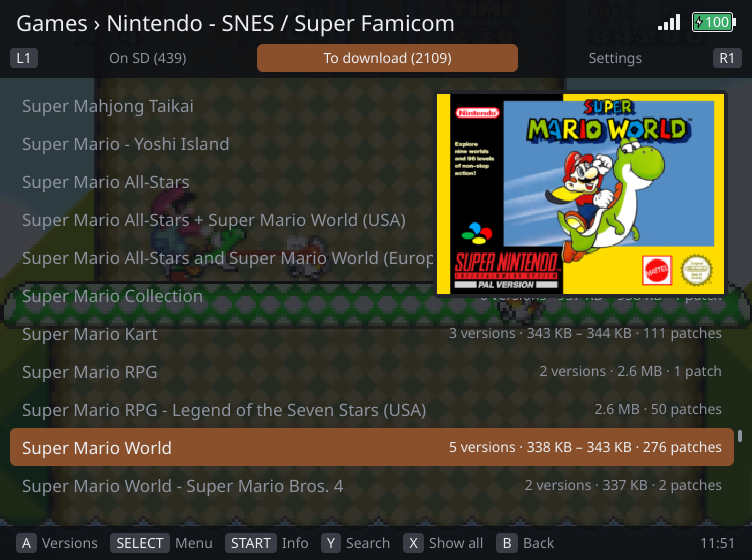
Kiln replaces the main menu of your handheld. Each system folder has a tab with the games on the card and a tab with the games you can download. The console itself downloads the games, their hacks and translations, their box art and their descriptions.
Free software · GPL-3.0 · written in Rust with Slint
Supported devices
On the Miyoo consoles Kiln runs on the stock Miyoo firmware and on Onion OS. On the RG35XXSP it runs on the stock Anbernic firmware only. Kiln installs as files on the SD card, and the console opens its own menu again when Kiln exits with an error.
Miyoo Mini Flip
Kiln replaces MainUI at 752×560. On Onion OS the GameSwitcher, keymon, Tweaks and the network services keep working.
Miyoo Mini Plus
The same release zip as the Flip. Kiln detects the firmware at start, and sets volume, brightness and Wi-Fi the way that firmware expects.
Anbernic RG35XXSP
Kiln replaces the stock frontend through a file that the firmware runs at boot. It lists the games of both SD cards, and starts RetroArch and the native emulators.
Support for more devices may come in future releases.
Features
What the stock menus and MainUI do not have
Downloads from the game list
R1 in a system folder opens the list of the games you can download, filtered, grouped by title and searchable. Kiln keeps the download queue across restarts, and resumes partial files.
You choose the sources, over BitTorrent, HTTP, WebDAV, FTP, SMB, or SFTP on the RG35XXSP. A small .kiln.toml in each folder lists them, and Kiln ships no sources of its own. The user guide explains how to write one.
Hacks and translations, patched on the console
Each game shows its number of patches. When you choose one, Kiln downloads the original ROM if the card lacks it, downloads the patch from romhacking.net's archive, and writes the patched copy next to the original.
Kiln applies IPS, UPS, BPS, PPF and xdelta patches on the console, also to the CD games of PlayStation, Sega CD, PC Engine CD and Neo Geo CD.
Box art, screenshots and game information
START opens a panel with the game's image, year, developer, genre, players, rating and description. Kiln ships the facts of libretro-database, which work without a network. The descriptions come from ScreenScraper, in your language when it has one.
Kiln downloads the images of every game you install from libretro's thumbnails. Box art, screenshot or title screen can appear beside the list, behind it, or both.
A main menu that changes no firmware file
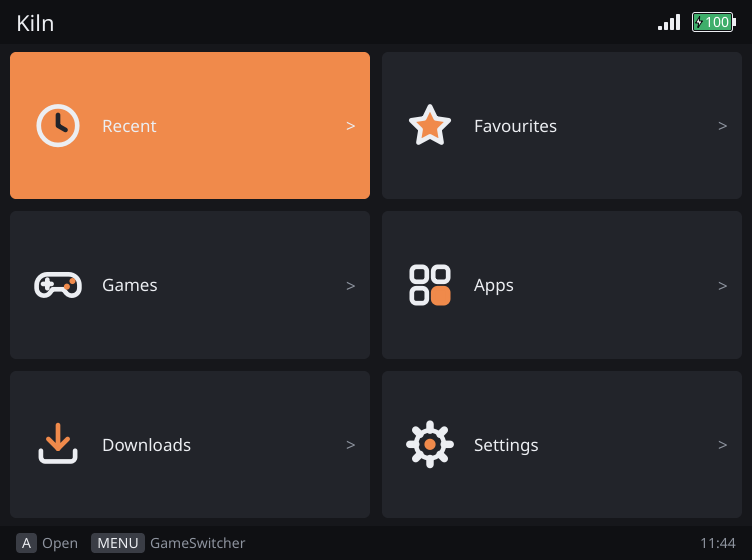
Kiln opens at boot and after every game, on the page and row you left. It changes none of the firmware's files. Hold SELECT at boot to open the stock menu, which also opens by itself after a crash of Kiln.
Recent and Favourites read and write MainUI's own lists, so both menus show the same games. Kiln also runs as an app from MainUI's Apps menu.
Every MainUI language, Arabic and Korean included
Kiln has a translation for every MainUI language. It ships fonts for Arabic, Bengali and Hangul, and uses the firmware's font for Chinese and Japanese. Kiln draws Arabic from right to left.
Kiln shapes and draws text at run time, so the font of a theme can replace the default font.
More features
Every Wi-Fi network saved
Kiln saves every network you join, such as home, office and a phone hotspot, and the console joins any of them in range. MainUI saves only the last one.
Updates from Settings
Kiln checks its GitHub releases once a day at most, shows a badge when a new version is out, and installs it from Settings.
Light, dark and accent colours
A dark and a light theme with eight accent colours. The same Settings page also sets volume, brightness and display colours.
PICO-8, EasyRPG and arcade sets
Kiln downloads the featured carts of the Lexaloffle BBS, lists each EasyRPG game folder as one game, and downloads FBNeo and MAME sets with their parent and BIOS sets.
Delete and Purge
Delete removes a game and its favourite and recent entries. Purge also removes its images, saves, states and per-game settings.
Per-folder emulator and core
The Settings tab of each folder sets its systems and emulator. On Onion, the folder also offers to enable a missing emulator.
Gallery
Kiln's screen on the consoles. Select a screenshot to enlarge it.
Install
Download the release
On GitHub Releases, kiln-miyoo-<version>.zip for both Miyoo consoles, kiln-rg35xxsp-<version>.zip for the RG35XXSP.
Extract the zip on the SD card
Turn the console off, put its SD card in your computer, and extract the zip at the root of the card. The files must not end up in a new folder named after the zip.
On the Miyoo, open Kiln from the Apps menu and turn on Settings, Interface, "Kiln as main interface". On the RG35XXSP, use the card in the first slot. Kiln opens at the next boot.
Add your sources
Put a .kiln.toml in each folder you want to download into, as the guide to source files shows. Kiln installs its own updates from Settings.
The user guide has the full instructions, and explains how to uninstall Kiln and how to recover from a failed start.